COMPREHENSIVE POS PLATFORM FOR MODERN STORESSell faster.
Sell faster.
Operate smarter.
Musezu POS connects sales, warehouse, human resources, QR ordering and revenue reporting on a single system.
✓No installation required✓Set up step by step✓Use on any device
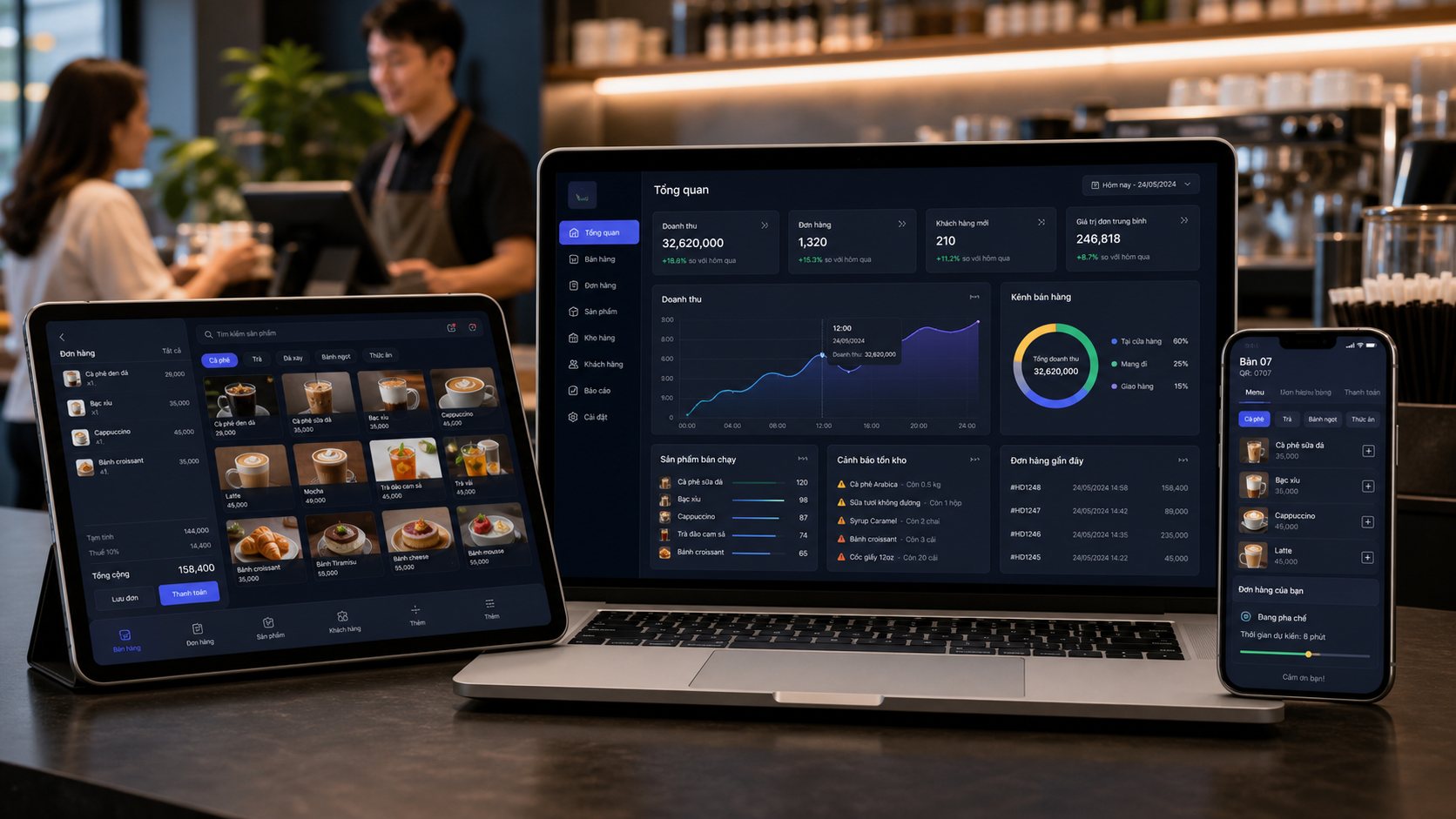


 No need to download the application
QR ORDER — ORDER AT THE TABLEGuests order their own food.
01Scan QROpen the menu right on your phone 02Choose and send foodTopping options, quantity, notes 03The counter and kitchen accept ordersInstant synchronization, limiting errors
Guests order their own food.
The counter and kitchen accept orders immediately.
Each table has its own QR code. Customers choose their food on their phone and send their order directly to the POS system — no need to wait for staff to take orders.
01 / 03
SOLUTIONS ACCORDING TO BUSINESS MODELS
Start right with how your store is running
No need to assemble dozens of tools yourself. Musezu displays the right functions, forms, and processes by industry.
Coffee shops & restaurants
Table map, QR ordering, toppings, quantities and kitchen screen.
- Table map & service status
- QR order at the table
- Topping & dish selection
- Recipe & ingredient quantities
- Kitchen / KDS in real time
- Closing shifts & checking cashier
- Promotions & loyal customers
Retail & mini-mart
Scan codes, manage variations, shipments and inventory by branch.
- Barcode, SKU & quick code scanning
- Size, color & attribute variations
- Import, export & adjust inventory
- Shipment & expiration date
- Controlled returns & refunds
- Suppliers & import debt
- Inventory by each branch
Services & chain stores
Appointment schedules, customers, human resources and consolidated reports throughout the system.
- Set schedules & manage time frames
- Customer profile and history
- Decentralize personnel by role
- Timekeeping & salary calculation
- Service packages & incentive programs
- Track work and performance
- Multi-branch consolidation report
SUPPORT OSAutomatic detectionCash gaps, low inventory, unusual refunds, and operational bottlenecks. Actionable recommendationsCreate input tickets, check transactions or transfer to the correct person with processing rights. Follow up until completionEach issue has a clear status from discovery, approval to execution.
The proactive system sees problems before you
Musezu POS continuously monitors sales and operational data to detect anomalies, explain their causes, and recommend appropriate actions.
VQ
Your assistantActive
Revenue analysisCheck inventoryInstructions for use
PRIORITY PROPOSALAdd another 12 L of fresh milk before the afternoon shift
FEATURES CREATE VALUE
All the tools you need to increase revenue and reduce loss
From the sales counter to management reports, data is always synchronized and ready for decision making.
01
Fast sales, reduced waiting time
Order, apply promotions and pay in just a few taps.
02
Revenue updated in real time
Track sales, profits, shift performance, and best-selling products on one dashboard.
03
The warehouse is always correct, minimizing loss
Synchronize inventory according to sales orders, warn about running out and manage quantity of raw materials.
04
QR ordering, increasing table rotation
Customers choose their own dishes on the phone, and orders are sent directly to the counter and processing area.
05
Chain management on one platform
Decentralize staff, monitor multiple branches, and standardize remote operations.
06
Closing shifts and checking transparently
Consolidate cash, cards, QR; Detect discrepancies and save full history.
07
SUPPORT OS
Proactively detect low inventory and unusual transactions before affecting operations.
08
Your assistant
Analyze data, answer questions and guide employees to properly perform each process.
GUIDED SETUP
From new account to first order
Each step has clear suggestions, suitable even for people who have never used POS software.
Create a store space
Register an account and enter store information for use throughout the system.
Choose a business model
Musezu configures menus, terminology and processes to suit your industry.
Add products and personnel
Enter the catalog, initial inventory, and grant the correct permissions to each role.
Open for sale and follow up
Start applying; Sales, inventory and alerts are continuously updated.
Ready to open a store on Musezu?No payment card required to start setup.
Get started nowONE SYSTEM, EVERY POINT OF SALE
Manage your store even when you're not around
Real-time dashboard helps store owners monitor sales, inventory, orders and employee performance anywhere.
- Intuitive revenue and profit reporting
- Warning of inventory and operational abnormalities
- Detailed authorization by role and branch
- QR ordering and multi-modal payment
OPERATIONAL EFFICIENCYThe entire store is within reach
99,9%synchronized data0 minutesWait for report at the end of the day1 placeManage all branches
FREQUENTLY ASKED QUESTIONS
Understand before you start
Things store owners often care about when switching to a new POS system.
Do I need to install software on my device?+
No. Musezu POS works in the browser and can be used on laptops, tablets or phones.
Can employees see the store owner's reports?+
No default. Each account only sees the functionality and data assigned to it by role and branch.
Is ordering QR the same as payment QR?+
No. QR ordering opens the menu for customers to send requests to the counter and kitchen. Payment QR only appears at the payment step.
Can I manage multiple branches?+
Have. Store owners can track sales, inventory, staffing and performance of each branch in the same system.
How is the cost of using Musezu POS calculated?+
You can start with the free plan, then choose the right plan according to your store size, number of branches, and set of features you need.
Is my sales data protected?+
Yes. Data is segregated by store, accounts are authorized by role, and people only access authorized sections.
If the network connection is lost, how will the store handle it?+
The system displays connection status clearly for staff to proactively handle. When the connection is stable again, data continues to be synchronized with the server.
Do I need to buy a specialized POS machine?+
Not required. You can use your existing computer, laptop, tablet or phone; Receipt printers and point of sale equipment can be added as needed.
Is it possible to transfer products from old software?+
Yes. Product categories can be imported as templates to reduce setup time. The support team will guide you on how to standardize data before transferring.
Does Musezu provide setup support and employee training?+
Yes. The setup process has step-by-step instructions, with help content in each module for store owners and employees to quickly get acquainted.
Ready to upgrade the way your store operates?
Create an account and set up your sales space according to instructions in just minutes.